Provide the professional security software for webmaster, administrator and advanced user

You are here: AQL Home »
AQL .htpasswd & .htaccess Password Manager »
FAQ »
Specify SMTP server port
How to specify SMTP server port?
Q: How to specify SMTP server port? My e-mail host works on a specific port.
A: The SMTP server port number is usually 25. AQL .htpasswd & .htaccess Password Manager v2.00, v2.10, v2.20 and v2.30 use the port 25 and doesn't support specific port. We have added this feature to v2.40 on Jun 02, 2007, please download the newest version at AQL Download Center.
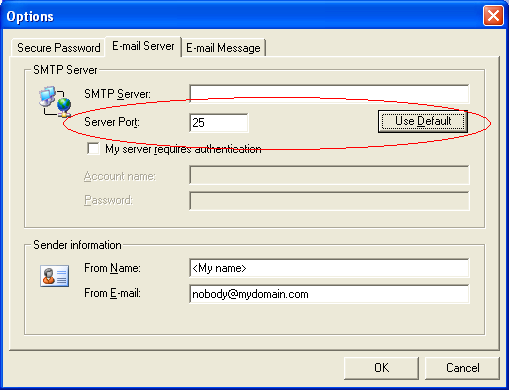
To specify SMTP server port, please do following steps:
- Launch AQL .htpasswd & .htaccess Password Manager, open the main window.
- Click menu: Tools -> Options, and then click E-mail Server tab.
- Specify the SMTP server port number on the Servoer Port field, as it is shown in the following screenshot:
- Click on OK button.
Get discount alerts, new product information and technical articles:
* Get 10% off your first order by joining our mailing list!
* You may safely unsubscribe at any time!
* You may safely unsubscribe at any time!